
You can get to Executive Reporting from:
- Deal Management page, toolbar, Report menu
- Main Menu>Analytics and Reporting>Executive
Running Executive Reports:
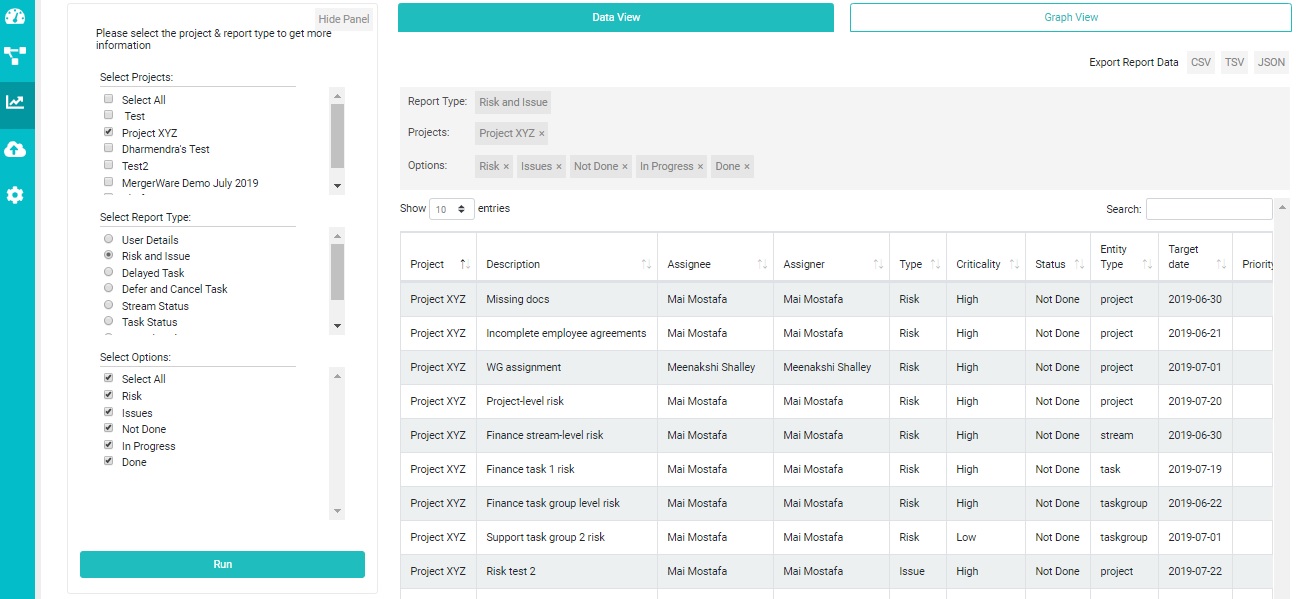
- You can run executive reports for ‘risks and issues’, ‘user details’, ‘task status’ and ‘stream status’ and many more
- Just select the deals that you would like to run the reports for
- Select the report type
- Each report type will give you options to choose from. For example, you can select which roles you would like to see in the ‘User Details’ report, for ‘Risks and Issues’ report you can choose per status or type or both
- If nothing shows up in the report pane on the right then there isn’t enough data for the report to run
- Once you have made all your selections, both data and graph reports will be populated
- You can switch between data and graph by clicking the links at the top
- You can also export data reports in csv, tsv and json formats, and you can download the graph report in svg format
 MergerWare Help Docs